.webp)
Google Business Profile for Doctors and Clinics: A 12-Point Optimization Checklist

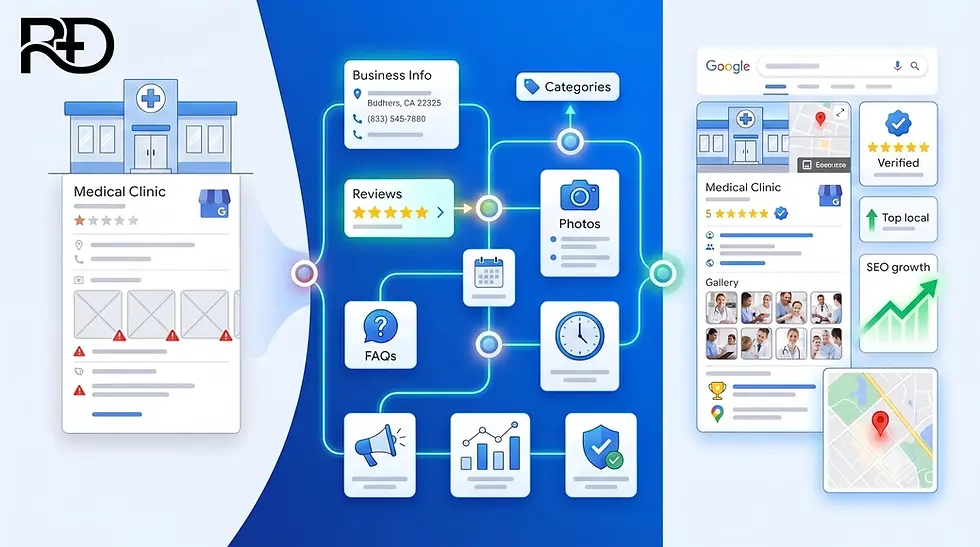
I notice something every time I search for a local clinic. Before I ever reach a website, my eyes go to the little box with a map, three business names, star ratings, and photos. I judge the clinic right there. Open now or not. Four stars or three. Real photos or none. I make a decision before a single website has loaded.
That box is the Google Business Profile, and for a local practice it often does more work than the website ever will. Basically, it is free, not paid. The frustrating part is that most clinics set it up once, forget it, and quietly lose patients to a competitor who simply keeps theirs tidy.
I wrote this Google Business Profile for doctors checklist to fix that. It is twelve clear steps, in plain language, covering everything from claiming your profile to responding to reviews without breaking patient privacy law. Whether you are a solo doctor or you run a busy clinic, work through these in order. None of them require code, and most take an afternoon.
Why Your Profile Is the Heart of Local SEO for Doctors
When a patient searches for care near them, Google shows two different things. There are the normal blue-link results, and above them sits the "map pack" - the map with the top three local listings. Those two are ranked in different ways, and the map pack is what most people look at first.
This is the whole reason local SEO for doctors matters. The map pack is powered almost entirely by your Google Business Profile. Google decides who appears there based on three broad things: how relevant your profile is to the search, how close you are to the patient, and how prominent and trusted you look.
You cannot move your clinic closer to every patient. But relevance and trust are yours to control, and that is what this checklist builds.
Key takeaway: The map pack is where local patients decide, and your Google Business Profile is what puts you there.
The 12-Point Google Business Profile Checklist
1. Claim and verify your profile
Search your clinic name on Google. If a profile already exists, claim it. If not, create one and complete verification, which usually happens by phone, video, or postcard.
One more thing that matters: do not create duplicate profiles for the same location.
Duplicates split your reviews and confuse Google about which listing is real, and that hurts you in both.
2. Get your business name right
Use your real, real-world name. Nothing more. Adding keywords like "Dr. Sharma Best Skin Clinic Pune" goes against Google's guidelines and can get your profile suspended.
If you are an individual practitioner inside a larger practice, Google actually allows you a personal profile, named in the format "Practice Name: Dr. Full Name." You are also allowed to include a title or degree, such as Dr. or MD. Keep it clean and honest.
3. Choose the right categories
Your primary category is one of the strongest signals you control. Pick the one that describes your core work most precisely, such as "Dermatologist" rather than a vague "Medical clinic."
Then add a few relevant secondary categories for the other services you genuinely offer. Do not stuff this with categories that do not apply. Two or three accurate ones beat a long, loose list.
4. Make your NAP identical everywhere
NAP stands for Name, Address, and Phone number. These three details must read exactly the same on your website, your Google profile, and every directory you appear on - Healthgrades, Zocdoc, Vitals, Apple Maps, Bing, and any local listing.
Even small mismatches, like "Street" in one place and "St." in another, weaken Google's confidence that these listings are all the same clinic.
5. Complete every single field
An empty field is a missed signal. Fill in your full hours, including special holiday hours. Add your phone, your website, and, if you take online bookings, an appointment link directly on the profile. The easier you make it to book, the fewer patients you lose to the next name on the list.
6. Write a clear, specific description
You have room to describe your practice in your own words. Use two short paragraphs that say who you are, what you treat, and why a patient can trust you.
Write plainly. Name your specialties directly. This is not the place for marketing fluff, because both patients and Google are looking for clarity, not adjectives.
7. List all your services
Use the services section to spell out what you actually do, from broad specialties down to specific treatments and programs.
A patient rarely searches for "clinic." They search for a specific problem or procedure. The more clearly your services are listed, the more of those specific searches you can match.
8. Add real, high-quality photos
Upload genuine photos of your building exterior, your interior and waiting area, and your team. Patients use these to decide whether a place feels real and welcoming before they visit.
Fresh, honest images tend to earn more clicks and calls than a profile with none. Avoid generic stock photos, which patients see straight through.
9. Build a steady flow of genuine reviews
Reviews influence both whether a patient chooses you and how you rank locally. The best time to ask is soon after a visit, so a simple text or email with a direct review link 3 to 7 days later works well.
Ask honestly, never buy reviews, and aim for a steady trickle rather than a sudden burst. Recency and consistency matter as much as the total count.
10. Respond to reviews the HIPAA-safe way
This is the point most checklists skip, and it is the one that can cost you the most. When you reply to a patient review, you must not confirm that the person was ever your patient.
That sounds strange, but it is the law. Under HIPAA, even a warm "thank you for visiting our clinic" can be a violation, because it confirms a care relationship without the patient's permission.
The American Medical Association has warned physicians about exactly this. The risk is real: the Office for Civil Rights once fined a dental practice 50,000 dollars for disclosing patient information in a review response.
So how do you reply safely? Keep it generic.
Thank the reviewer for the feedback in general terms, never reference their specific treatment or visit, and move any real discussion offline with a phone number or email.
A safe reply reads something like: "Thank you for sharing your feedback. We take all concerns seriously and would welcome the chance to speak with you directly at [phone]." Acknowledge, do not confirm, and take it offline.
Key takeaway: You can respond to every review, but never confirm someone is a patient. Acknowledge, stay generic, and take specifics offline.
11. Use Google Posts and the Q&A section
Your profile has a Posts feature, a bit like a small social feed. Use it to share health tips, service updates, or seasonal reminders, which keeps the profile active.
Also check the Questions and Answers section, where anyone can post a question. Answer the common ones yourself, in plain language, before a stranger answers them for you.
12. Track your insights and keep it fresh
Google gives you a performance view showing how patients found you and what they did next - calls, direction requests, website clicks.
Check it every so often to see what is working. A Google Business Profile is not a one-time setup. It is a living listing that rewards small, regular attention.
Doctor Profile or Practice Profile?
This is the question I get asked most about profiles, so let me settle it. Google allows both a profile for the practice and a separate profile for an individual doctor who is public-facing and sees patients directly.
The rule to remember is one practitioner profile per provider, tied to a single primary location. A doctor should not create several profiles to cover each specialty or each service. One clean profile per person, one per practice location. That is it.
My Take
After looking at a lot of local clinics, here is what I actually believe. Most practices do not lose the map pack to a stronger competitor. They lose it to their own neglected profile - an unclaimed listing, a wrong category, three old reviews, no photos.
That is oddly good news, because it means the fix is in your hands and it costs almost nothing. If I could only do three things from this list, I would claim and verify the profile, get the primary category exactly right, and build an honest, steady stream of reviews.
Those three carry most of the weight. The rest sharpens the edge.
I will be honest that Google changes how this works fairly often, and I keep learning as it does. But the direction has held for years. Clinics that keep a clear, accurate, well-reviewed profile get chosen. The ones that set it and forget it slowly disappear from the box that patients actually look at.
If you are a doctor or a clinic trying to get found by nearby patients, this is the kind of work I help with every day.
I write clear, accurate healthcare content and help practices tidy up the local details that decide whether Google shows you or skips you.
If that would help, I would be glad to. You can see how I approach SEO for doctors and healthcare content marketing and reach out from there.
Frequently Asked Questions
Is a Google Business Profile free for doctors?
Yes. Creating, verifying, and managing a Google Business Profile costs nothing. The only investment is the time it takes to complete it properly and keep it updated.
Can a doctor and the clinic each have a separate profile?
Yes. Google allows a profile for the practice and a separate one for an individual public-facing practitioner. The limit is one practitioner profile per provider, tied to a single primary location.
How do I get more patient reviews?
Ask soon after the visit. A short text or email with a direct review link, sent 3 to 7 days later, works best. Ask genuinely, never pay for reviews, and aim for a steady flow rather than a one-time push.
Can I respond to reviews without violating HIPAA?
Yes, if you stay generic. Never confirm the person was your patient or mention their treatment. Thank them in general terms and invite them to continue the conversation offline. Even "thanks for visiting" can breach HIPAA, so keep replies neutral.
Why does a competitor rank above me in the map pack?
Usually it comes down to relevance, proximity, and prominence. A more accurate category, consistent information across the web, and more recent reviews often explain the gap more than anything else.
How long does it take to see results?
It varies with your location, competition, and how complete your profile is. Anyone promising an exact timeline is guessing. Treat it as steady maintenance, and expect gradual improvement rather than an overnight jump.


